Why This Guide?
If you’ve shopped at Family Dollar and kept your receipt, you’ve probably seen an invitation to take the Family Dollar survey at www.ratefd.com. This guide demystifies the process: who can enter, how to submit your feedback, what the sweepstakes typically offers, what to do if your transaction ID won’t work, and how to handle coupons and app perks the smart way. You’ll also find detailed FAQs, entry tips, and plain-English explanations of the most confusing parts.

Family Dollar Survey at a Glance
| Item | Details |
|---|---|
| Survey Name | Family Dollar Survey (a.k.a. RateFD Survey) |
| Official Survey URL | www.ratefd.com |
| Purchase Required? | No (see official rules for any mail-in or alternate means of entry) |
| Typical Prizes | Up to $1,000 in cash daily / other prizes valued at $1,500 weekly (per official rules; subject to change) |
| Entry Methods | Online via www.ratefd.com or mail (when available—see official rules) |
| Entry Limit | One entry per receipt (verify your receipt/rules) |
| Location | U.S. (check official rules for eligible jurisdictions) |
| Languages | English / Spanish |
| Age Requirement | 18+ (see rules) |
| Receipt Validity | Often limited (sometimes 7 days); some promos list “unlimited”—always check your receipt |
| Customer Support | 1 (844) 636-7687, 1 (866) 377-6420 |
| Official Site | www.familydollar.com |
What Is www.ratefd.com?
www.ratefd.com (often printed on your Family Dollar receipt) is the official destination to complete the Family Dollar Customer Satisfaction Survey. You’ll answer a short set of questions about your in-store experience—cleanliness, product availability, staff behavior, checkout speed, and more.
At the end, you’ll typically have the option to enter a sweepstakes for a chance to win prizes such as $1,000 daily and weekly prize drawings (e.g., $1,500 in value or $500 gift cards, depending on the promotion period and rules).
Why it exists: Feedback helps Family Dollar identify what’s working, what isn’t, and where stores can improve. Your responses can lead to better stock levels, faster checkouts, and cleaner aisles at your local store.
How to Take the Family Dollar Survey (Step-by-Step)
You’ll need:
• A PC/laptop/smartphone/tablet with internet
• A recent Family Dollar receipt with a transaction ID
• A valid email address (to receive sweepstakes notifications if you win)
• English or Spanish proficiency
• You must be 18 years or older (verify rules)
1) Visit the official survey URL
Go to www.ratefd.com. You should see the Family Dollar survey welcome page.
2) Choose your language
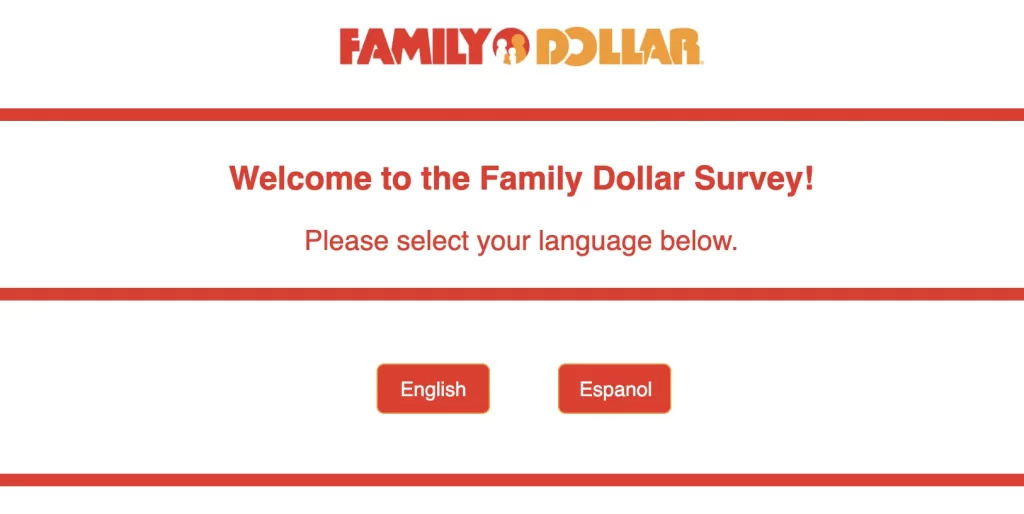
Select English or Español (Spanish) to proceed.
3) Enter your Transaction ID
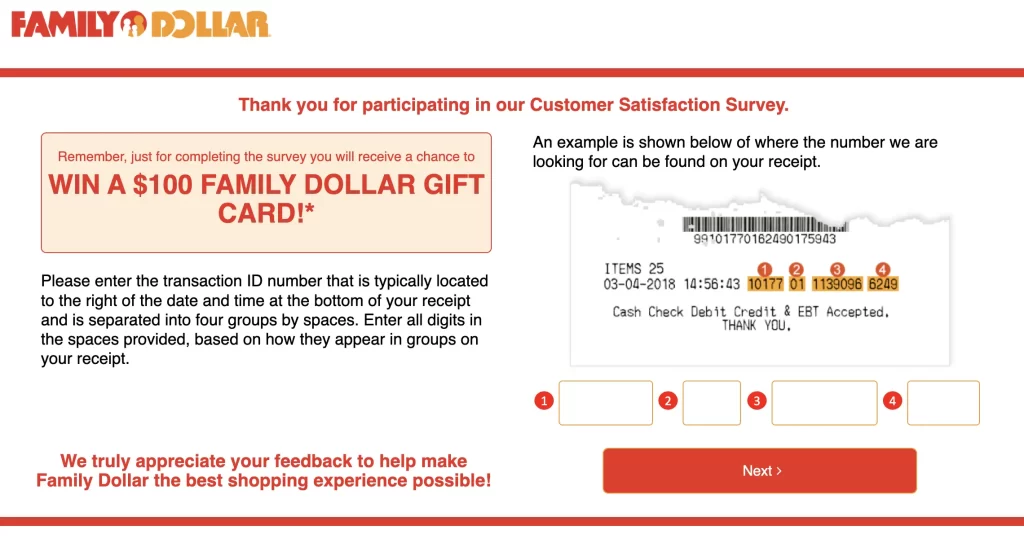
On the bottom portion of your receipt, you’ll find a Transaction ID (often split into four groups). Type the digits into the corresponding fields exactly as they appear.
- Tip: If there are leading zeros, include them.
- No spaces beyond what the boxes already segment.
4) Start answering questions
Expect questions about:
- Store cleanliness & safety
- Product availability / out-of-stocks
- Prices & promotions
- Staff friendliness, courtesy, and helpfulness
- Checkout speed and any issues at the register
- Whether you used Family Dollar coupons or the Family Dollar app
- Any problems you encountered (e.g., pricing, returns, maintenance)
5) Submit & sweepstakes entry
When you hit Submit, you should be offered an option to enter the sweepstakes. Provide requested contact details (name, phone, email) so you can be notified if you win. Always review the official rules for entry windows, privacy terms, and prize details.
Where to Find the Transaction ID on Your Receipt
- Look near the date & time line toward the bottom.
- The Transaction ID often appears as four groups separated by spaces.
- If your receipt layout differs, look for a line labeled “Transaction,” “Trans ID,” or “Survey Code.”
Troubleshooting: If the code fails, verify:
- Digits vs. letters (e.g., O vs 0, I vs 1)
- You’ve entered all groups
- The receipt is within the allowed timeframe for the survey
Eligibility, Rules & Entry Limits
| Topic | What to Know (Always verify your receipt/rules) |
|---|---|
| Age | Typically 18+ |
| Residency | Generally U.S. residents (see official rules for any exceptions) |
| Employees | Family Dollar employees and immediate family/household are usually not eligible |
| Purchase | No purchase necessary (check for mail-in or alternate entry if available) |
| Entry Limit | Often one entry per receipt |
| Receipt Window | Some promos say 7 days; other materials may say unlimited. Your receipt governs. |
| Prizes | Commonly advertised at $1,000 daily and $1,500 weekly (or $500 gift card), but subject to official rules |
| Chances of Winning | Depend on the number of eligible entries received |
Pro tip: Some national survey programs run daily/weekly drawings across multiple brands. Don’t assume the prize pool or odds—always read the exact rules tied to your receipt.
What You’ll Be Asked (And Why It Matters)
Examples of survey themes:
- Overall satisfaction with your visit
- Store environment: lighting, cleanliness, restroom status
- Product availability: did you find everything?
- Pricing & value: any price mismatches or shelf tag confusion
- Team behavior: courtesy, helpfulness, problem-solving
- Checkout experience: line length, speed, accuracy
- Coupons & app usage: were digital/print Family Dollar coupons easy to use?
How your answers help: Aggregated feedback is used to fix assortment gaps, improve staffing at peak hours, update planograms, and audit pricing. In other words, your input can directly shape a smoother next trip.
Rewards & Sweepstakes: What Can You Win?
| Reward Type | Typical Description |
|---|---|
| Daily Prize | Often up to $1,000 cash (per official rules; may vary) |
| Weekly Prize | Other prizes sometimes valued around $1,500 |
| Gift Cards | Some materials reference $500 Family Dollar gift cards |
| Coupons/Offers | At times, bonus coupons may be offered to survey participants |
Important: This guide summarizes commonly advertised rewards, but only the official rules (linked from www.ratefd.com or your receipt) control the details, values, and odds.
No-Purchase Entry (Mail-In) Basics
Many surveys provide alternate means of entry (AMOE) so you can enter without a purchase. The availability, address, and format change by promotion.
- If a mail-in entry is allowed, you’ll find the exact instructions in the official rules (e.g., hand-print your name, address, phone, email on a 3″×5″ card and mail to the listed address within specific dates).
- Do not guess the AMOE address—use only the address and format listed for the current sweepstakes period.
How to Use Family Dollar Coupons (In-Store & Online)
In-store:
- Present paper coupons at checkout or clip digital offers via the Family Dollar app.
- Verify expiration dates, brand/size restrictions, and limit per item rules.
- If stacked with promos, the register will choose a valid combination per policy.
Online:
- At familydollar.com, enter a promo code (when offered) during checkout.
- Watch for app-exclusive deals or weekly ads that sync to your account.
NLP/LSI terms: Family Dollar coupons, clip digital coupons, promo code, weekly ad, in-store savings, app-exclusive offers.

The Family Dollar App
Download:


Why install it:
- Browse weekly ads, scan items, and clip digital coupons.
- Build a shopping list and check store inventory (when available).
- Get push notifications for new promos and seasonal deals.
Customer Service & Contact Info
| Channel | How to Reach |
|---|---|
| Phone (General Support) | 1 (844) 636-7687 |
| Alternate Support | 1 (866) 377-6420 |
| Mailing Address | Executive Offices, P.O. Box 1017, Charlotte, NC 28201-101 |
| Official Website | www.familydollar.com |
| Survey URL | www.ratefd.com |
| Social Media | Facebook: facebook.com/familydollar Twitter/X: twitter.com/myfamilydollar Pinterest: pinterest.com/familydollar YouTube: youtube.com/user/TheFamilyDollar Instagram: instagram.com/familydollar |
Common Issues
| Problem | Likely Cause | Quick Fix |
|---|---|---|
| “Code not recognized” | Mistyped Transaction ID | Re-enter carefully; watch 0/O and 1/I |
| “Receipt expired” | Past the time limit for entry | Check your receipt’s deadline; consider AMOE if allowed |
| Survey frozen | Browser cache or connection | Refresh, switch browsers, or try another device |
| No sweepstakes prompt | Not offered for your receipt/period | Read your receipt fine print; not all periods have the same offers |
| Didn’t get confirmation | Typo in email or submission glitch | Re-enter (if allowed) or contact support |
| Coupon failed at checkout | Expired or item mismatch | Verify expiration, brand/size rules; ask cashier for help |
Data Privacy & Safety Tips
- Complete the survey only at www.ratefd.com.
- Avoid third-party sites claiming guaranteed wins.
- Read the privacy policy and official rules before sharing contact info.
- Sweepstakes never require payment to claim a prize. If someone asks, it’s a scam.
How Your Feedback Improves Stores
Your responses are used to:
- Balance staffing during peak hours
- Correct pricing and shelf tag issues
- Improve assortment and reduce out-of-stocks
- Address cleanliness and maintenance gaps
- Enhance service training and checkout speed
The bottom line: better experiences, better value, and a store that reflects what customers actually want.
Frequently Asked Questions
1) What is www.ratefd.com?
www.ratefd.com is the official survey portal for the Family Dollar Customer Satisfaction Survey. You’ll answer questions about your visit and may be able to enter a sweepstakes afterward.
2) Do I need a purchase or receipt to enter?
To take the online survey, you typically need a recent Family Dollar receipt with a valid transaction ID. Many promotions also include a no-purchase option (like mail-in)—check the official rules printed on your receipt or the survey site.
3) What prizes can I win?
Promotions often advertise $1,000 daily and $1,500 weekly prizes, and some materials reference $500 gift cards. Only the official rules define the current prizes.
4) How long does the survey take?
Most people finish in 5–10 minutes.
5) Is there a limit to entries?
Generally, one entry per receipt for the online method. Official rules control any limits per person/household.
6) What if my transaction ID doesn’t work?
Double-check the digits (especially O/0 and I/1), include leading zeros, and confirm you’re still within the entry window. If it still fails, try another browser/device or contact support.
7) Can Family Dollar employees enter?
Employees and immediate family/household members are usually not eligible. See rules.
8) Is the survey available in Spanish?
Yes. Choose Español on the survey landing page.
9) How will I know if I’ve won?
Winners are typically contacted via email or phone within set timeframes. You may need to complete eligibility and release paperwork.
10) Is www.ratefd.com safe?
Use the official URL and a secure connection. Review the privacy policy and rules before submitting your info. Never pay money to claim a prize.
11) What kind of questions should I expect?
Topics include store cleanliness, product availability, staff courtesy, pricing accuracy, checkout speed, and your use of coupons or the app.
12) Can I enter without a purchase?
Often, yes—if the promotion offers a mail-in or alternate entry. Follow the exact formatting and address listed in the official rules.
13) Do coupons stack with other offers?
Sometimes—but coupon fine print rules. Check expiration dates, item size/brand, and limits at the register.
14) My receipt says “unlimited.” What does that mean?
Some periods note unusual validity language. When in doubt, the official rules on your receipt control. If it conflicts with what you see online, defer to the printed rules for that promotion window.
15) Can I complete more than one survey?
If you have multiple receipts, you may be able to submit multiple entries (subject to rules). Typically, it’s one survey per receipt.
16) How do I contact Family Dollar about survey issues?
Call 1 (844) 636-7687 or 1 (866) 377-6420, or visit www.familydollar.com to use the support form.
17) I didn’t receive a sweepstakes prompt—why?
Some receipts/promotions may not include sweepstakes entry, or the entry period ended. Check your receipt fine print.
18) What if I moved or changed my email after entering?
If chosen as a winner, the administrator will use the contact info you provided when entering. Keep an active email and voicemail.
19) Can I view past winners?
Some promotions publish winner lists upon request. If offered, the official rules will explain how to obtain them.
20) Where can I find the official rules?
Look for a “Rules,” “Official Rules,” or “Sweepstakes Rules” link on www.ratefd.com or follow the instructions on your receipt.
Is It Worth Your Time?
If you already shop at Family Dollar, 5–10 minutes to complete a survey is a small trade for the chance at daily or weekly prizes—and a better store experience next time. Your input can help fix real pain points: out-of-stocks, register delays, aisle clutter, or price mismatches.
Quick “Start Now” Checklist
- Receipt with Transaction ID
- www.ratefd.com open on your device
- English/Spanish selected
- 5–10 minutes set aside
- Contact info ready for sweepstakes (if offered)
Final Word
This tutorial is for information only. We’re not the official website and don’t run the survey or sweepstakes. Logos and trademarks belong to their respective owners. For the latest promotion specifics, always rely on the official rules linked from www.ratefd.com or your receipt.
Good luck—may your entry be the lucky one!
Refresh your home #FDHomeRefresh! YOU could WIN @Glade Package & $300 Family Dollar Gift Card! http://t.co/1HDPWdkbA6 pic.twitter.com/Up90t8j3cM
— Family Dollar (@familydollar) January 30, 2015
WIN the ultimate family reunion with @PatNeelyBBQKing & a year of FREE groceries! Enter here: http://t.co/Agst8I6NIf pic.twitter.com/xMDQqLryYz
— Family Dollar (@familydollar) April 30, 2015
Room refresh? ENTER our #FDHomeRefresh Sweeps & you could WIN a room makeover & other prizes!http://t.co/oGc05Zs59w pic.twitter.com/3pCB4J4oM0
— Family Dollar (@familydollar) January 31, 2015
What kind of mess are you? Take our quiz to find out! You could score cool prizes & coupons! http://t.co/JmyFaKEY4L pic.twitter.com/lWxoMv9hy0
— Family Dollar (@familydollar) February 17, 2015